---
title: Solving email domain issues in Stryd
description: Solving email domain issues in Stryd
---
[Skip to content](https://knowledge.stryd.au/solving-email-domain-issues-in-stryd#main-content)
English - Australia
Show submenu for translations
[Submit a query or issue](https://knowledge.stryd.au/kb-tickets/new?hsLang=en-au)

Open main navigation
Close main navigation
- English - Australia
Show submenu for translations
- [Submit a query or issue](https://knowledge.stryd.au/kb-tickets/new)
- [Book a 15 min support call](https://meetings-ap1.hubspot.com/sara-arganese/15-min-support-call-sara)
[Book a 15 min support call](https://meetings-ap1.hubspot.com/sara-arganese/15-min-support-call-sara)
How can we help you?
- There are no suggestions because the search field is empty.
1. [Stryd Broker](https://knowledge.stryd.au/?hsLang=en-au)
2. [How to use Stryd](https://knowledge.stryd.au/how-to-use-stryd?hsLang=en-au)
11 March 2026
# Solving email domain issues in Stryd
## This guide will help you identify and fix the most common causes so your domain can validate successfully.
When setting up your **email domain in Stryd**, the system validates your domain using DNS records.
If your domain does **not validate**, it is usually caused by one of the following:
• The DNS records were **copied incorrectly from Stryd**
• The DNS records were **added to the wrong DNS provider**
#### Step 1: Check the DNS records were entered correctly
When adding the CNAME records from Stryd:
• Ensure the **record type is CNAME**
• Confirm the **Name/Host** value matches exactly
• Confirm the **Target/Value** matches exactly
• Check that **no extra spaces or characters** were added
Even small differences will cause validation to fail.
---
#### Step 2: Confirm where your DNS is managed
Your domain may be purchased through one provider but **managed by another DNS provider**.
For example:
You may have purchased your domain through **GoDaddy**, but the DNS may actually be managed by **Webcentral** or another provider.
You must add the records to the **system that manages your DNS**.
---
#### Step 3: Find your DNS provider
To identify where your DNS is managed:
1. Go to
[http://dnschecker.org/ns-lookup.php](http://dnschecker.org/ns-lookup.php)
2. Enter your **domain name**
3. Check the **Name Server (NS) results**
Example:
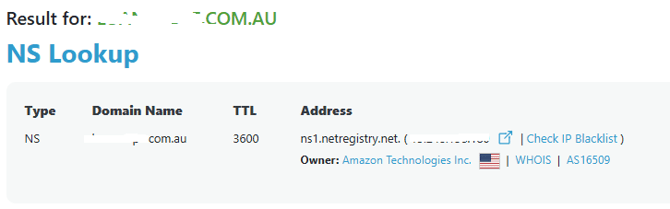
These results show which system controls your DNS.
---
#### Step 4: Identify the DNS provider
If you're unsure who manages the name server:
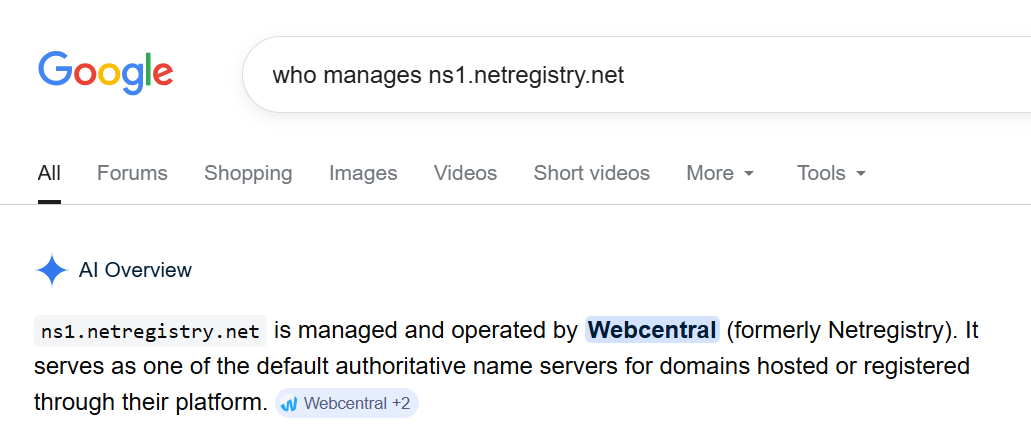
• Copy the **name server address**
• Search it in Google
Example:
#### Step 5: Add the records in the correct system
Once you know the DNS provider:
1. Log in to that provider’s DNS portal
2. Open **DNS or Zone Management**
3. Add the **CNAME records provided by Stryd**
4. Save your changes
DNS updates can take a short time to propagate.
---
#### If validation still fails
Check that:
• Records are **CNAME**, not TXT or A records
• The **values match Stryd exactly**
• The records were added to the **correct DNS provider**
For Help from the Stryd team, submit a query via Help or email support@stryd.au
- [FAQs](https://knowledge.stryd.au/faqs?hsLang=en-au)
- [How to use Stryd](https://knowledge.stryd.au/how-to-use-stryd?hsLang=en-au)
[](http://stryd.au)
[mailto:email@email.com](mailto:email@email.com)
Copyright © 2025, Moneycatcha Pty Ltd