---
title: Filter Loan Offers by Features
description: loan features
---
[Skip to content](https://knowledge.stryd.au/filter-loan-offers-by-features#main-content)
English - Australia
Show submenu for translations
[Submit a query or issue](https://knowledge.stryd.au/kb-tickets/new?hsLang=en-au)

Open main navigation
Close main navigation
- English - Australia
Show submenu for translations
- [Submit a query or issue](https://knowledge.stryd.au/kb-tickets/new)
- [Book a 15 min support call](https://meetings-ap1.hubspot.com/sara-arganese/15-min-support-call-sara)
[Book a 15 min support call](https://meetings-ap1.hubspot.com/sara-arganese/15-min-support-call-sara)
How can we help you?
- There are no suggestions because the search field is empty.
1. [Stryd Broker](https://knowledge.stryd.au/?hsLang=en-au)
2. [How to use Stryd](https://knowledge.stryd.au/how-to-use-stryd?hsLang=en-au)
11 March 2026
# Filter Loan Offers by Features
## Learn how to view loan product features and filter loan offers based on offset or redraw functionality.
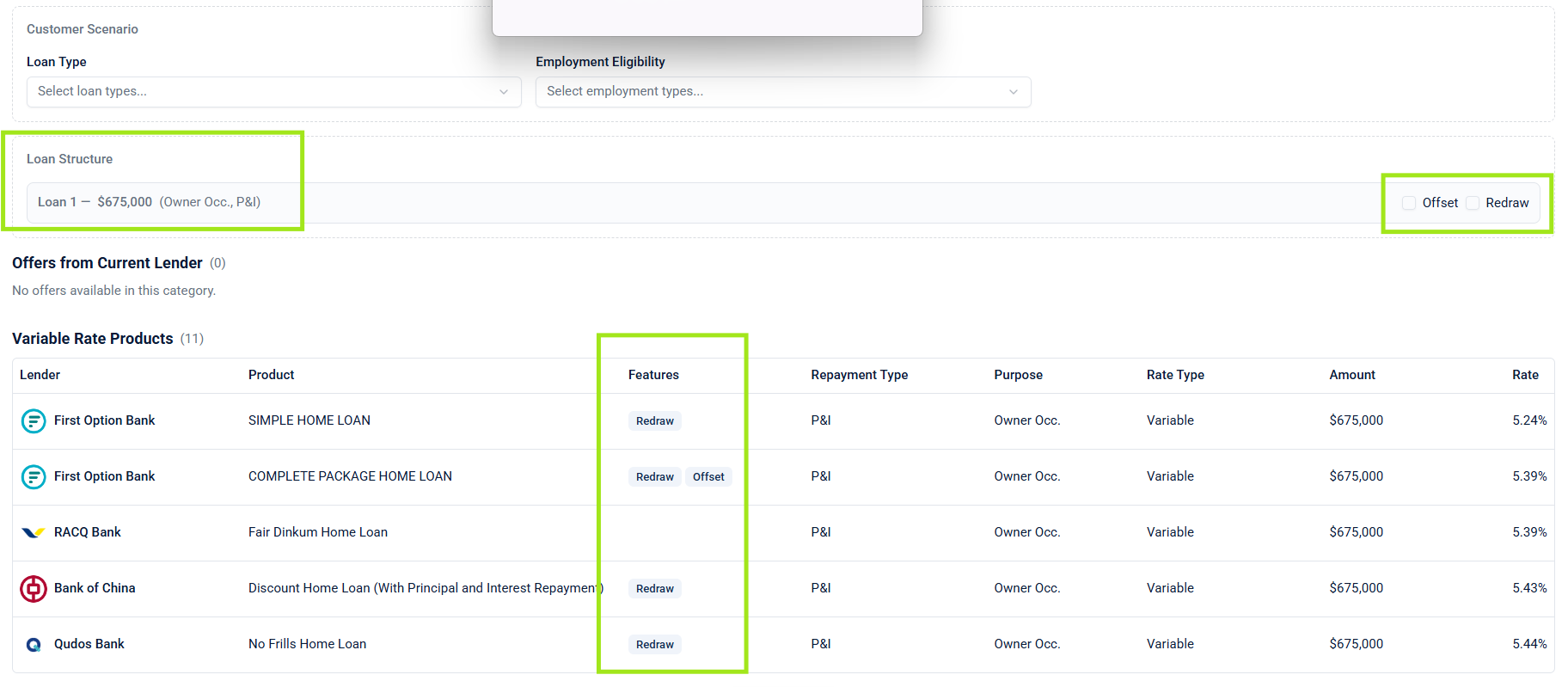
#### Stryd now displays key loan product features directly within the loan offers table. This allows you to quickly identify whether a product includes features such as **offset** or **redraw**.
You can also filter loan offers to show only products that include a specific feature. This helps you compare loan offers more effectively when specific features are required.
#### Steps
### View Loan Features in Loan Offers
• Open a customer record.
• Navigate to the **Loan Offers** section.
• Locate the **Features** column in the loan offers table.
• Review the feature indicators to see whether each product includes **offset** or **redraw** functionality.
### Filter Loan Offers by Feature
• Go to the **Loan Structure** section at the top of the loan offers page.
• Select the feature filter you want to apply (for example, **Offset**).
• The loan offers list will automatically update to display only products that include the selected feature.
#### When to Use / Common Scenarios
**Customer requires an offset account**
Filter the results to show only loan products that include an offset feature.
**Comparing loan functionality**
Quickly identify which products support redraw or offset before recommending options to a customer.
#### Outcome
You can quickly identify which loan products include specific features and filter the loan offers list to display only the options that meet a customer’s requirements.
#### Troubleshooting / Tips
• If you cannot see the feature column, ensure you are viewing the loan offers table within a customer record.
• The current feature indicators are limited to **offset** and **redraw** functionality.
• Use feature filters when a customer has a specific loan requirement to narrow down comparisons.
#### Quick Steps
• Open a customer record.
• Go to the **Loan Offers** section.
• Check the **Features** column to view available loan features.
• Go to the **Loan Structure** section.
• Select a feature filter (e.g., Offset).
• Review the filtered loan offers.
- [FAQs](https://knowledge.stryd.au/faqs?hsLang=en-au)
- [How to use Stryd](https://knowledge.stryd.au/how-to-use-stryd?hsLang=en-au)
[](http://stryd.au)
[mailto:email@email.com](mailto:email@email.com)
Copyright © 2025, Moneycatcha Pty Ltd